How Many CCTV Cameras Do I Need? 2, 4, 6 & 8 Camera Systems Explained
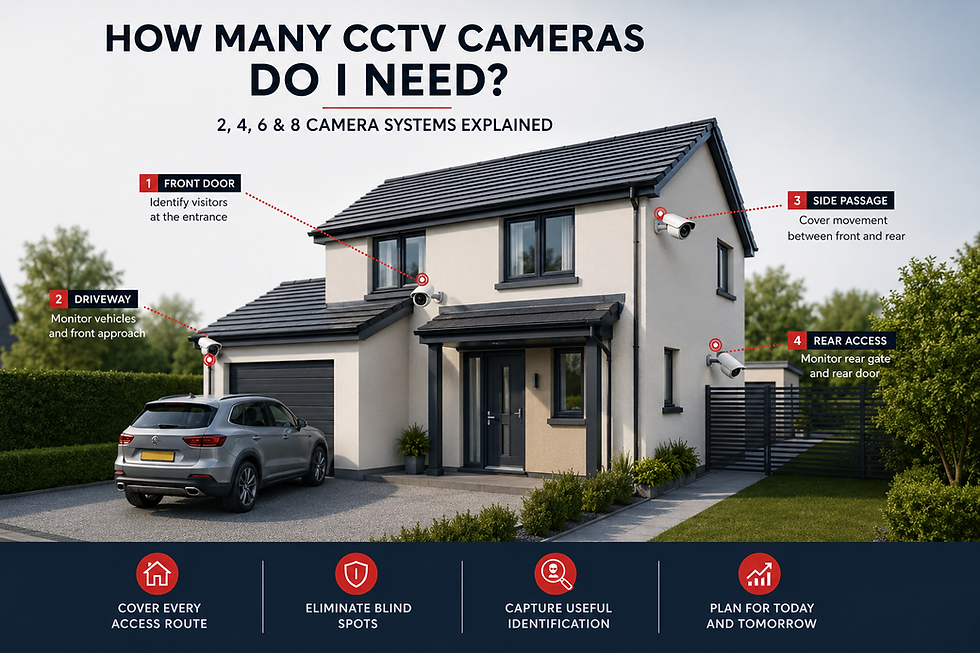
The right number of CCTV cameras is not determined by the size of your house alone. It depends on how many important access routes, vulnerable areas and blind spots need to be covered, and what level of detail you need from each position.
For some homes, two carefully positioned cameras can provide highly effective coverage. Another property of a similar size might need four or six because it has a separate driveway, side access, detached garage, multiple entrances, rear alley or several vulnerable approaches.
The objective should therefore never be to install as many cameras as possible. It should be to use enough correctly positioned cameras to cover every important access route without creating unnecessary duplicate footage.
⬛ THE QUICK ANSWER
For many UK homes, the following provides a useful starting point.
2 Cameras
A two-camera system can suit a smaller property where the main security priorities are the front entrance or driveway and the rear entrance or garden access.
4 Cameras
Four cameras can work extremely well where a property has a front entrance, driveway, side passage and rear access.
6 Cameras
Six cameras may be appropriate for a larger semi-detached or detached home with multiple elevations, more than one side route, a garage or several entrances.
8 Cameras
Eight-camera CCTV systems can suit large detached homes, multiple buildings, large gardens, several vehicle entrances or smaller commercial premises.
These are only examples. A well-designed three-camera system can provide better security than eight poorly positioned cameras.
🟥 THE MOST IMPORTANT RULE
Camera count should follow access routes — not package size.
CCTV systems are commonly sold in two, four and eight-camera packages. That makes it tempting to choose the number of cameras first and then look for somewhere to install them.
The better approach is the opposite.
First identify where somebody could approach the property, where they could enter, which routes are hidden from normal view, which assets need protecting and where identification-level footage would be valuable.
Once those questions have been answered, the required camera count usually becomes much clearer.
Start by Mapping Your Property
Walk around the outside of your home as though you were approaching it for the first time. Look at every realistic route somebody could use.
These could include the front door, driveway, side gate, side passage, rear gate, patio doors, garage, shed, garden office, basement entrance or shared access.
You do not automatically need one camera for every location. Several areas can sometimes be covered by one carefully selected camera.
For example, a small front entrance and driveway may sit comfortably within one useful view. A large driveway with a recessed doorway could require separate cameras because one wide-angle image would make people at the entrance too small.
⬛ THINK IN SECURITY ZONES
Instead of immediately counting cameras, divide the property into security zones.
Front approach: Who is approaching the property?
Main entrance: Can somebody standing at the front door be identified?
Side access: Could somebody move towards the rear without appearing on another camera?
Rear access: Could somebody enter through a rear gate or door?
Vehicles: Is activity around parked vehicles clearly visible?
Outbuildings: Are garages, sheds or garden offices adequately protected?
Once those zones are mapped, the appropriate number of cameras becomes much easier to determine.
Is a 2-Camera CCTV System Enough?
For some homes, absolutely.
A simple property with two main access routes may only require a front and rear camera.
Camera 1 — Front
The front camera could cover the main entrance, front path and, where the layout allows, part of the driveway.
Camera 2 — Rear
The second camera could monitor the rear entrance, rear gate or principal garden access route.
This arrangement can work particularly well for smaller terraced homes, compact properties without side access or houses where the rear can only be approached through one predictable route.
The important thing is that both cameras provide useful evidence rather than simply broad overview images.
Example: Two Cameras on a London Terraced House
Imagine a terraced house with no side passage, a small front garden and a rear garden accessed through a rear alley.
A front camera could be positioned to identify people approaching the entrance from the pavement. A rear camera could then cover the rear gate and back door.
In that situation there may be very little security benefit in installing four cameras simply because a four-camera package is available.
🟥 TWO GOOD CAMERAS CAN BE BETTER THAN FOUR BAD ONES
Consider two systems.
System A has two cameras positioned correctly. Camera 1 identifies people at the front entrance, while Camera 2 identifies people entering the rear garden.
System B has four cameras, but two show almost the same driveway, one is mounted too high and the fourth records mostly lawn.
System B has twice as many cameras, but System A may provide significantly more useful evidence.
Camera count is not the same as CCTV quality.
When Is a 4-Camera CCTV System Appropriate?
Four cameras provide a very useful layout for many UK homes.
A typical configuration might include the front entrance, driveway, side passage and rear access.
Camera 1 — Front Door
Focused on visitors and people approaching the main entrance.
Camera 2 — Driveway
Focused on vehicles and the wider approach from the road.
Camera 3 — Side Passage
Covers movement between the front and rear and helps remove a common blind spot.
Camera 4 — Rear Gate or Rear Door
Monitors the main rear access route and provides another useful identification point.
Together, these cameras create a logical sequence around the property. Someone approaching the house may first appear on the driveway camera, then on the entrance camera, before being picked up by the side or rear camera if they move around the building.
Is Four Cameras Enough for a Detached House?
Possibly.
A smaller detached property with predictable access routes may only need four cameras. For example, a camera could cover the driveway, another the front entrance, another the main side passage and another the rear entrance.
However, detached properties often have independent access down both sides of the building. If both routes are vulnerable, additional cameras may be justified.
The correct number depends on the actual property rather than the word detached.
When Would I Need 6 CCTV Cameras?
Six cameras start to make sense when four cameras leave meaningful gaps.
Consider a larger property with a front entrance, wide driveway, left-side passage, right-side passage, rear entrance and detached garage.
A six-camera system could give each of those security-critical areas its own useful view without unnecessary duplication.
Before adding camera number five or six, ask one simple question:
What does this camera show that the existing cameras do not?
If the answer is that it removes a genuine blind spot, covers another access route or provides identification at a garage entrance, it has a clear purpose.
If the answer is simply that it provides another general view of the same driveway, it may not add much value.
When Would I Need 8 CCTV Cameras?
Eight-camera systems can be appropriate for larger or more complicated properties.
A large detached home might have a main gate, long driveway, front entrance, two side routes, rear entrance, garage and garden office. In that situation, eight cameras could have eight clearly defined functions.
An example might be:
Camera 1 — Main gate
Camera 2 — Driveway
Camera 3 — Front entrance
Camera 4 — Left-side access
Camera 5 — Right-side access
Camera 6 — Rear entrance
Camera 7 — Garage
Camera 8 — Garden office
An eight-camera system makes sense when the property genuinely has eight areas that deserve useful coverage.
Installing eight cameras simply because the recorder has eight channels is not good CCTV design.
Does an 8-Channel NVR Mean I Need 8 Cameras?
No.
An eight-channel NVR simply provides capacity for a compatible system to support up to the relevant number of cameras within its technical specification.
You could install five cameras today and leave three channels available for future expansion.
That can be particularly useful if you expect to add a garden office, electric gate, extension, additional parking area or another outbuilding later.
🟥 PLAN FOR THE CAMERAS YOU MAY NEED TOMORROW
Future-proofing does not mean installing unnecessary cameras today.
It can mean selecting infrastructure that leaves sensible room for expansion.
That might include spare NVR channels, additional storage capability, spare PoE capacity, suitable network infrastructure or installing an extra data cable during renovation.
A good CCTV system should solve today's security requirement without unnecessarily limiting tomorrow's options.
How Many CCTV Cameras Do I Need for a Terraced House?
Many London terraced properties have relatively simple access.
If the property has a front entrance, rear garden and no side passage, two or three cameras may sometimes be sufficient.
A front camera could identify people at the entrance. A second could cover the rear access. If the front driveway or garden needs a separate wider view, a third camera may be added.
The layout should determine the camera count rather than assuming every terraced home needs four cameras.
How Many CCTV Cameras for a Semi-Detached House?
Semi-detached homes often introduce an additional side route that needs protection.
A common layout might use one camera at the main entrance, another covering the driveway, a third on the side passage and a fourth covering the rear entrance.
That makes four cameras a useful starting point for many semi-detached properties.
A larger home with a garage, two rear entrances or a wider garden may require more.
How Many CCTV Cameras for a Detached House?
Detached properties generally have more potential approach routes because people can often access several sides of the building.
A CCTV survey might consider the front entrance, driveway, left elevation, right elevation, rear entrance, garage, garden gates and outbuildings.
This could lead to a four, six or eight-camera system depending on the layout.
There is no reason to install one camera on every building corner simply because four corners exist.
Why One Camera on Every Corner Can Be a Bad CCTV Design
Mounting one camera on each corner of a house looks logical, but it does not automatically create useful coverage.
The result can be four extremely wide overview images in which faces remain small, entrances are far away and vehicles obstruct important details.
A better design asks what needs to be recorded at each stage of someone's movement around the property.
Who enters the driveway? Who reaches the front door? Who passes through the side gate? Who enters the rear garden?
Those questions usually lead to stronger camera positions.
For more detail, see our guide to where CCTV cameras should be positioned.
🟥 DON'T DESIGN CCTV AROUND THE BUILDING'S CORNERS
Design the system around people, vehicles, doors, gates, routes and assets.
Once those targets have been identified, determine where each camera should be positioned.
Sometimes the corner of the building will be perfect. Sometimes it will be completely wrong.
Can One CCTV Camera Cover Two Areas?
Yes, and this can reduce the number of cameras needed.
One camera might cover the front door and a small driveway, while another might cover both the rear entrance and nearby garden gate.
The important question is whether both areas remain clear enough within the image.
If making the camera wide enough to see both areas causes people to become too small for useful identification, separate cameras may be better.
One Wide Camera vs Two Focused Cameras
Imagine a large driveway.
One ultra-wide camera could show the driveway, vehicles, pavement, gate and front door. Everything technically appears in the image, but somebody at the far end of the drive may occupy only a tiny part of the picture.
A better solution could be two cameras: one providing a wide overview and another providing a tighter view at the entrance.
Now the system provides both context and detail.
That can be far more useful than relying on one impressive-looking panoramic image.
Detection vs Identification
A CCTV camera can show that somebody is present without showing enough detail to identify them.
Video surveillance design often distinguishes between different levels of detail, including detection, observation, recognition and identification.
The useful level of detail depends on factors such as camera resolution, lens, distance, target size and field of view.
This is why adding another correctly focused camera can sometimes be more valuable than making an existing camera cover an even wider scene.
⬛ ASK WHAT EACH CAMERA NEEDS TO DO
Different cameras can have different purposes.
One camera may only need to detect somebody entering a rear garden. Another may need to provide clear facial detail at the front door. Another may provide a broad view of vehicles on a driveway.
Those jobs can require different camera positions, lenses, resolutions and viewing angles.
A good CCTV system does not need every camera performing exactly the same role.
How Many CCTV Cameras Do I Need for a Driveway?
The answer depends on driveway size, the number of vehicles, entrance width, building position and what level of detail is required.
A small single-car drive may need only one camera.
A larger driveway might benefit from one camera providing a broad overview of vehicles and another positioned towards the entrance to capture people or vehicles arriving and leaving.
If reliable registration-plate capture is important, that may create a separate specialist requirement.
Do I Need a Separate Number-Plate Camera?
Not necessarily.
However, you should not assume that a general 4K CCTV camera will automatically provide reliable number-plate identification.
Plate capture depends on factors including distance, angle, vehicle movement, lighting, headlights, camera settings and the equipment itself.
A camera designed to provide a wide overview of a property may not simultaneously be ideal for reading number plates.
If plates are important, specify that requirement when the system is designed.
How Many Cameras Do I Need for the Rear Garden?
Usually fewer than people initially expect.
Instead of trying to record every square metre of the garden, identify how somebody could actually enter it.
That might be through a rear gate, side gate, alley, garage or low boundary.
A large garden with one controlled entrance could potentially need only one well-positioned camera. A smaller garden with three separate access routes may require more.
🟥 THE LAWN IS RARELY THE MOST IMPORTANT SECURITY TARGET
The useful evidence is usually created around the gate, rear door, side passage or boundary access point.
Focusing cameras on those areas can provide better evidence while reducing unnecessary recording of neighbouring property.
How Many Cameras Do I Need for a Garage?
A garage does not automatically need its own camera.
First check whether the driveway or another existing camera already provides useful coverage.
A dedicated camera may be appropriate where the garage is detached, hidden from the main property or contains valuable vehicles, bicycles, tools or machinery.
Sometimes mounting a camera on the garage itself can also provide a useful additional view towards the house or driveway.
What About Sheds and Garden Offices?
The same principle applies.
A garden office may contain computers, monitors and business equipment. A shed could contain bicycles, power tools or garden machinery.
These assets may justify CCTV coverage, but the camera does not necessarily have to point directly at the building.
Monitoring the route somebody must use to reach the outbuilding can sometimes provide better identification.
How Many CCTV Cameras Do I Need for a Flat?
Often only one.
A video doorbell or entrance camera may provide the main security coverage required by a flat.
However, flats create additional considerations because the camera may also record communal halls, neighbouring doors, shared entrances or stairways.
The Information Commissioner's Office advises that domestic CCTV capturing areas outside the private domestic boundary can bring additional data-protection responsibilities.
Residents should also consider lease conditions, tenancy agreements, landlord requirements and building-management rules before fixing equipment to communal property.
CCTV Cameras and Neighbouring Properties
Adding more cameras increases the possibility of recording surrounding areas.
That does not mean a multi-camera CCTV system is automatically inappropriate, but cameras should be configured to minimise unnecessary recording of neighbouring gardens, windows, doors and communal spaces where possible.
Privacy masking can be particularly useful when a camera needs to cover your own driveway or gate but also sees an unrelated neighbouring area.
⬛ MORE CAMERAS = MORE RESPONSIBILITY
Every additional camera can mean more footage, more storage, more maintenance, more network traffic and more privacy considerations.
Camera count should therefore increase only where the additional view adds genuine security value.
The aim is complete useful coverage, not maximum surveillance.
How Does Camera Count Affect Storage?
Camera quantity has a direct effect on the amount of footage produced.
An eight-camera system can generate substantially more data than a two-camera system when the cameras use similar recording settings.
Storage requirements depend on the number of cameras, resolution, frame rate, compression, recording schedule and desired retention period.
The hard-drive capacity and NVR specification should therefore be calculated around the actual system rather than guessed.
Does 4K CCTV Need More Storage?
Generally, higher-resolution footage can require more storage when other variables remain similar.
Actual storage usage also depends on compression, frame rate, movement within the image and whether recording is continuous or event-based.
Eight 4K cameras recording continuously can therefore create a completely different storage requirement from two 4K cameras recording selected events.
How Camera Count Affects Your Network
This is particularly important with IP CCTV.
Each camera produces network traffic, and larger systems require greater consideration of bandwidth, Ethernet infrastructure, PoE switch capacity, recorder capability, cable lengths and future expansion.
A multi-camera CCTV installation should therefore be considered part of the wider network rather than simply a collection of independent cameras.
AZ Electrical provides networking, Wi-Fi and data cabling where CCTV systems require supporting infrastructure.
How Many PoE Ports Do I Need?
Each compatible PoE camera needs an appropriate PoE connection, either through a
PoE-capable NVR or network switch.
If your system contains six PoE cameras, the network infrastructure needs enough suitable connections for those six devices.
However, simply counting ports is not enough.
🟥 DON'T ONLY COUNT POE PORTS
PoE equipment also has an available power budget.
Different cameras can require different amounts of electrical power, particularly higher-powered equipment such as some PTZ or infrared cameras.
An eight-port PoE switch does not therefore automatically mean that any eight cameras can be connected regardless of specification.
Should I Buy an 8-Channel NVR for 4 Cameras?
It can make sense.
Leaving spare channels gives the system room to expand without automatically replacing the recorder later.
However, channel count is only one consideration. The NVR also needs suitable resolution support, bandwidth, storage capacity and compatibility with the cameras being used.
An eight-channel label alone does not tell you whether the recorder is suitable.
Wired vs Wireless CCTV and Camera Count
Camera quantity can affect which connection method makes the most sense.
For one or two cameras, Wi-Fi can be extremely practical where wireless coverage is strong and the recording method suits the user.
With four cameras, wireless can still work well, but network reliability becomes more important.
With six, eight or more permanent cameras, wired IP or PoE infrastructure becomes increasingly attractive because every camera has a structured physical connection rather than depending entirely on Wi-Fi coverage around the property.
See our full guide to wired vs wireless CCTV.
What If I Already Have Poor Wi-Fi?
Do not install several Wi-Fi cameras and hope the connection improves.
Check wireless performance at the actual proposed camera positions, including the front wall, rear garden, garage, side elevation and outbuilding.
The broadband speed beside your router is not the same thing as Wi-Fi performance outside your home.
If several cameras rely on wireless connectivity, the property may require better access-point placement, mesh networking, wired access points or a move towards Ethernet-connected cameras.
Do More Cameras Make a Property More Secure?
Only if they improve useful coverage.
Additional cameras can remove blind spots, provide alternative viewing angles and cover more entrances.
But too many cameras can also produce duplicate views, unnecessary privacy intrusion, extra maintenance, higher storage requirements and more footage to review.
Security comes from system design, not camera quantity.
🟥 THERE IS A POINT WHERE MORE CCTV STOPS ADDING MUCH VALUE
Imagine five cameras already provide good coverage of the front entrance, driveway, left side, right side and rear access.
A sixth camera shows almost exactly the same rear patio. A seventh shows an area with no access route. An eighth records the centre of the lawn.
The property now has eight cameras, but the extra security value may be minimal.
What Is Camera Overlap?
Camera overlap means an important area appears from more than one useful angle.
This can be valuable where someone entering through a side gate is captured by one camera and then appears on another as they approach the rear door.
That creates a sequence of evidence.
Overlap should be intentional. Two cameras mounted beside one another showing virtually identical views usually add far less value.
When Is CCTV Redundancy Useful?
Redundancy can be appropriate for higher-risk areas such as a main vehicle entrance, high-value storage location, commercial loading bay or other critical access point.
If one camera fails, is obstructed or damaged, another may still provide evidence.
That level of redundancy is not necessarily required around every domestic garden gate.
The system should reflect the actual risk.
How Many Cameras Does a Shop Need?
A small shop might require cameras covering the entrance, shop floor, till area, stock room and rear door.
That could mean four to six cameras depending on the layout.
One wider camera may provide context across the sales floor while separate cameras provide more focused views at the entrance or till.
The number should follow the security requirement rather than a standard shop package.
How Many Cameras Does an Office Need?
An office may need coverage of reception, main entrance, rear entrance, car park and other external approaches.
A small office might require three to five cameras, while a larger building may require considerably more.
Businesses also need to consider their data-protection responsibilities when recording employees, customers, contractors and visitors.
How Many Cameras Does a Warehouse Need?
There is no useful generic number.
Warehouses can require coverage of entrances, loading bays, goods-in areas, stock aisles, warehouse floors, emergency exits, yards, perimeters, vehicle gates and car parks.
A warehouse may need eight, sixteen, thirty-two or many more cameras depending on its size and operational requirements.
At that point, CCTV becomes a full surveillance and network-infrastructure project rather than a simple home camera installation.
Should Every Room Have CCTV?
Usually not in a domestic setting.
Home CCTV is typically most valuable around external approaches and important access points.
Internal cameras may be appropriate for particular security requirements, but installing them throughout living areas without a defined purpose can create unnecessary privacy concerns.
For many homes, external CCTV combined with an intruder alarm provides a more balanced layered-security approach.
CCTV vs Intruder Alarm: Should I Just Add More Cameras?
Not necessarily.
Imagine your home already has useful visual coverage of the front entrance, rear access and side gate.
Adding several more cameras may provide relatively little additional protection.
An intruder alarm introduces a different layer by detecting events such as doors opening, windows being breached or movement inside the property.
CCTV and alarms perform different jobs and can complement one another.
Cameras and Security Lighting
Before adding another camera because an existing image is poor at night, check the lighting.
Strategically positioned lighting can improve the performance of an existing camera.
Poorly positioned lighting can create glare, overexposure, deep shadows or silhouettes.
The solution to poor night-time CCTV is not always another camera. Sometimes it is a better camera position, better lighting or a camera more suited to the conditions.
Should I Add Cameras to Every Blind Spot?
Not necessarily.
Some areas are not visible on CCTV but do not create a meaningful security problem.
A narrow inaccessible area with no entrance, valuable asset, window or useful hiding point may not need another camera.
A blind spot becomes important when somebody could use it to approach an entrance, reach a vulnerable window, hide from other cameras or move between important areas undetected.
⬛ DON'T CONFUSE "NOT VISIBLE" WITH "NOT SECURE"
Your CCTV system does not necessarily need to show every centimetre of the property.
If an area contains no useful access route, vulnerable opening, valuable asset or realistic hiding point, monitoring it may add little.
Security coverage should be risk-based.
How Many Cameras Should Face the Front of the House?
Usually one or two for an ordinary home.
One camera may be sufficient where the front entrance and driveway are close together and both remain clear within the image.
Two cameras can be better where one provides identification at the entrance and the second provides a wider driveway or vehicle overview.
Larger detached frontages may justify additional views, but every camera should have a specific purpose.
How Many Cameras Should Cover the Rear?
Again, one or two will often be enough for an ordinary home.
One camera may cover both the rear gate and rear door where they are close together.
A larger garden might need one camera at the immediate rear entrance and another around a distant gate or outbuilding.
Avoid installing several cameras simply to show the garden from multiple angles.
Do I Need Cameras on Both Sides of the House?
Only if both sides provide meaningful access.
A detached house with usable paths on both sides may justify a camera on each.
If one side is completely inaccessible because of another building or permanent boundary, a separate camera may provide little value.
Should CCTV Cameras See Each Other?
They can, but they do not have to.
What matters is whether somebody moving through important parts of the property passes through several useful camera views.
Natural overlap can help capture a person from different angles without deliberately pointing cameras at one another.
How Many Cameras Should I Install During a Renovation?
You may want to install fewer cameras than cables.
Renovation is an ideal opportunity to prepare for future CCTV positions while walls, ceilings and floors are accessible.
For example, you might install four cameras today but provide six suitable CCTV data points.
The spare connections can support future cameras if the property changes.
🟥 PLAN MORE CONNECTIONS THAN CAMERAS
This can be especially useful during major refurbishment or a new build.
Running an additional data cable while walls are open can be far easier than creating a concealed route after everything has been plastered and decorated.
Future-proof the infrastructure without installing unnecessary cameras today.
Do I Need CCTV for Full 360-Degree Coverage?
Not necessarily.
For an ordinary home, covering every metre of the boundary can be less useful than covering the routes somebody must use.
If all realistic approaches eventually lead through a gate, driveway, side passage or entrance, cameras positioned at those predictable points can provide excellent security evidence.
Commercial properties with high-value perimeter requirements are a different matter.
For many homes, route coverage is more useful than literal 360-degree surveillance.
Are PTZ Cameras a Replacement for Several Fixed Cameras?
Not automatically.
PTZ stands for pan, tilt and zoom. These cameras can physically move and monitor a large area.
However, a PTZ camera can only look in one direction at a particular moment. If it is pointed towards a gate, it may not simultaneously be watching the garage.
For continuous unattended evidence, fixed cameras can therefore remain important.
A PTZ camera may complement a fixed-camera system rather than replace several cameras altogether.
Are Fisheye Cameras a Replacement for Several Cameras?
Sometimes, particularly in indoor environments.
A fisheye or panoramic camera can provide a very wide overview, but identification and overview are different jobs.
A panoramic camera might provide excellent situational awareness while a dedicated fixed camera provides stronger identification at an entrance.
Choose the camera type according to the purpose rather than simply trying to reduce camera count.
Should All My CCTV Cameras Record Continuously?
Not necessarily.
Modern systems can use continuous recording, scheduled recording, event recording or motion-based recording.
The method selected can significantly affect storage requirements.
Eight cameras recording continuously will normally create far more footage than eight cameras recording selected events.
However, motion-based recording also needs to be configured properly so important activity is not missed.
How Long Should CCTV Footage Be Kept?
There is no single universal retention period that applies to every domestic CCTV
installation.
UK government guidance advises that footage should not be kept longer than necessary for the purpose for which it was recorded.
As camera count increases, so does the amount of footage generated. Storage capacity and retention therefore need to be considered together.
Cybersecurity and Multiple CCTV Cameras
Modern IP cameras are network-connected devices.
Each camera may have firmware, user accounts, passwords and remote-access capabilities.
The National Cyber Security Centre recommends security measures for smart cameras including changing default passwords, using strong credentials, enabling two-step verification where available and keeping devices updated.
As camera count increases, managing the system consistently becomes even more important.
⬛ AN 8-CAMERA SYSTEM IS ALSO A NETWORK OF DEVICES
Modern CCTV is not simply video equipment attached to the outside of a building.
Each IP camera can be a network endpoint containing software, firmware, credentials and remote-access functionality.
Larger CCTV systems should therefore be treated as part of the property's wider technical infrastructure.
Example: Typical London Semi-Detached House
Imagine a property with a front door, driveway, side passage, rear garden, rear door and shed.
At first glance, six areas might suggest six cameras.
After a survey, however, the system might only require four.
Camera 1 covers the front entrance. Camera 2 provides a driveway overview. Camera 3 protects the side passage. Camera 4 covers the rear gate, rear door and shed approach.
The result is four cameras instead of six because one carefully positioned camera can perform more than one useful function.
That is good CCTV design.
Example: Larger Detached London Home
Now consider a larger property with a main gate, long driveway, front entrance, left-side access, right-side access, rear entrance, detached garage and garden office.
This property could legitimately require eight cameras because there are eight distinct security requirements.
In that situation, an eight-camera system is not excessive. Every camera has a specific job.
Example: Small Commercial Premises
A small London commercial property might need coverage of the customer entrance, reception, main working area, stock room, rear entrance and loading area.
A six-camera system could therefore provide a logical layout where each camera covers a different security or operational risk.
Again, the camera count follows the site rather than an arbitrary package.
🟥 THE BEST CAMERA COUNT IS THE NUMBER YOU CAN EXPLAIN
For every camera in a proposed CCTV system, ask:
What problem is this camera solving?
A strong answer might be:
It identifies people at the front entrance.
It removes the blind spot down the side passage.
It provides an overview of vehicles on the driveway.
It covers the detached garage, which the other cameras cannot see.
If the only explanation is that the installer normally fits eight cameras, that tells you very little about whether eight cameras are right for your property.
2 vs 4 vs 6 vs 8 CCTV Cameras
2 Cameras
Often suited to simpler homes with two main access routes, such as front and rear.
The main advantage is simplicity. The main limitation is that side routes, garages or outbuildings may remain uncovered.
4 Cameras
A useful choice for many terraced and semi-detached homes where the front entrance, driveway, side route and rear access all need coverage.
Four cameras can provide an excellent balance between coverage and complexity.
6 Cameras
Can suit larger homes with additional side routes, garages, wider gardens or several entrances.
Storage, networking and recorder capacity begin to become increasingly important.
8 Cameras
Can suit large detached homes, multi-building properties and smaller commercial premises.
Eight cameras can provide comprehensive coverage where all eight are genuinely necessary.
⬛ CAMERA COUNT GUIDE
Small terraced home: often around 2–3 cameras.
Typical semi-detached home: often around 3–4 cameras.
Larger semi-detached or smaller detached home: often around 4–6 cameras.
Large detached home: often around 6–8+ cameras.
Small commercial premises: commonly around 4–8 cameras depending on layout.
These are illustrative starting points rather than fixed rules.
The shape and access routes of the property matter more than the property category itself.
Questions to Ask Before Choosing the Number of CCTV Cameras
Before deciding, consider:
How many ways can somebody enter the property?
Which entrances are least visible?
Can one camera cover two areas without losing important detail?
Do you need identification or only general overview footage?
Are vehicles or number plates important?
Do garages or outbuildings require separate coverage?
Are there genuine blind spots?
Can the NVR support future expansion?
Is the network suitable for the proposed cameras?
How much footage do you want to retain?
Does every proposed camera have a clear security purpose?
If these questions are answered first, choosing the correct camera count becomes much easier.
Home CCTV Camera Count Checklist
Before installation:
Map the property.
Mark every entrance.
Mark side and rear routes.
Identify garages and outbuildings.
Identify vehicle areas.
Find hidden approaches.
Decide where identification is required.
Look for areas one camera can combine.
Avoid unnecessary duplicate views.
Consider neighbour privacy.
Plan night-time performance.
Calculate storage requirements.
Check NVR capacity.
Check PoE capacity.
Plan future expansion.
Plan cabling.
Review actual recordings after installation.
🟥 GET THE COVERAGE RIGHT BEFORE COUNTING CAMERAS
Buying more cameras is easy.
Designing a system that produces useful footage is harder.
A professional CCTV installation should begin with the property and security requirement, then determine how many cameras are actually necessary.
That approach can often produce better security with fewer cameras.
Professional CCTV Installation in London
AZ Electrical provides professional CCTV installation in London for homes and businesses.
Rather than beginning with a predetermined package, a CCTV system can be designed around the property's entrances, vulnerable areas, camera positions, blind spots, identification requirements, night-time conditions, recording needs, storage, PoE infrastructure and future expansion.
For a deeper explanation of camera placement, read Where Should CCTV Cameras Be Positioned?.
If you're deciding between different connection methods, see our guide to Wired vs Wireless CCTV.
You can also see our guide to CCTV installation costs in London.
Where supporting infrastructure is required, AZ Electrical provides networking, Wi-Fi and data cabling, while intruder alarm installation can provide an additional layer of protection.
Contact AZ Electrical to discuss the right CCTV coverage for your London property.
Frequently Asked Questions About
CCTV Camera Numbers
How Many CCTV Cameras Do I Need for My House?
There is no universal number. Count important access routes and vulnerable areas rather than rooms or exterior walls.
Many smaller properties may need only two or three cameras, while larger detached homes can require six, eight or more.
Is 2 CCTV Cameras Enough?
Yes, where a property has two main security-critical routes such as the front entrance and rear access.
Homes with side passages, garages or several entrances may require additional cameras.
Is 4 CCTV Cameras Enough?
Four cameras can provide excellent coverage for many UK homes.
A typical arrangement might cover the front entrance, driveway, side access and rear entrance.
Is 6 CCTV Cameras Too Many for a House?
Not if six separate areas genuinely need coverage.
A larger detached home may have multiple side routes, garage access, rear entrances and a wider driveway that justify six cameras.
Do I Need 8 CCTV Cameras?
Only where the property requires them.
Eight cameras can make sense on larger homes and commercial premises, but installing eight simply because an eight-camera package is available can create unnecessary duplication.
How Many CCTV Cameras Do I Need for a Terraced House?
Two or three can often provide useful coverage where there is a front entrance and rear access but no independent side passage.
The exact layout should always determine the final number.
How Many CCTV Cameras Do I Need for a Semi-Detached House?
Three or four is a useful starting point for many homes because side access often needs to be monitored in addition to the front and rear.
Larger properties may require more.
How Many CCTV Cameras Do I Need for a Detached House?
Potentially four to eight or more depending on side access, garages, gates and outbuildings.
Detached properties vary too much for one fixed recommendation.
Should I Put a CCTV Camera on Every Corner of My House?
Not automatically.
Camera positions should be chosen according to entrances, routes, identification requirements and vulnerable areas rather than building corners.
Can One CCTV Camera Cover My Front Door and Driveway?
Sometimes.
If both areas remain clearly visible with sufficient detail, one camera may work. Larger frontages may benefit from separate entrance and driveway views.
Can One CCTV Camera Cover My Rear Door and Garden?
Potentially.
A camera focused on the principal rear access route may cover both the gate and rear door.
Trying to record the entire garden can reduce useful detail.
Should My Garage Have Its Own CCTV Camera?
Only if another camera does not already provide useful coverage or if the garage contains assets that justify a dedicated view.
Is an 8-Channel NVR Only for 8 Cameras?
No.
You can use fewer cameras and retain spare channels for future expansion, provided the recorder's overall technical specification supports the system.
Can I Add CCTV Cameras Later?
Usually yes, provided the recorder, network, storage and power infrastructure can support additional compatible cameras.
Planning spare capacity from the beginning can make future expansion easier.
Do More CCTV Cameras Need More Storage?
Generally, yes.
More cameras generate more video, so storage requirements should be designed around camera count, resolution, frame rate, recording schedule and retention period.
Is PoE Good for Multi-Camera CCTV?
PoE can be particularly useful for permanent multi-camera IP systems because compatible cameras receive network connectivity and electrical power over Ethernet cabling.
The supporting switch or recorder must still provide sufficient port and power capacity.
Should I Install Extra Cameras Just in Case?
Usually not.
Providing infrastructure for future cameras can make sense, but every active camera should have a defined purpose.
Is CCTV Better With Overlapping Cameras?
Strategic overlap can provide multiple useful angles at important locations.
Unnecessary duplicate views add little security value.
How Many Cameras Does a Small Business Need?
A smaller business may require four to eight cameras depending on entrances, customer areas, stock, rear access and external areas.
A site survey is the best way to determine the correct number.
Is Professional CCTV Planning Worth It?
For multi-camera systems, professional planning can help avoid duplicate cameras, blind spots, poor angles, inadequate storage and network limitations.
The goal is not more cameras.
The goal is better coverage.
Sources and Further Reading
This guide provides general CCTV planning information. The appropriate number of cameras depends on the individual property layout, camera specification, security requirements, lighting and required image detail.
⬛ About the Author
Aaqil Zeyad is the owner of AZ Electrical Engineering Services Ltd, a London-based residential and commercial electrical contractor providing professional CCTV, smart security, intruder alarms, networking, data cabling and electrical services.
AZ Electrical works with homeowners and businesses across London and surrounding areas, designing CCTV systems around actual entrances, access routes, camera coverage, recording and network requirements rather than automatically recommending a predetermined number of cameras.


Comments